
在Selenium中选择单选按钮和复选框
 Krishna Rungta
 Selenium中的单选按钮
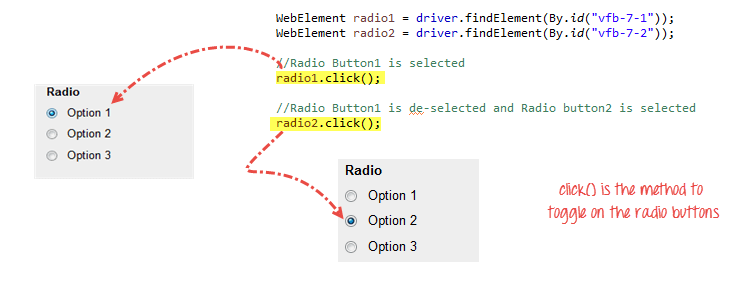
单选按钮也可以通过click()方法进行切换。
使用https://demo.guru99.com/test/radio.html进行练习,可以看到radio1.click()会选中“Option1”单选按钮。radio2.click()会选中“Option2”单选按钮,同时“Option1”保持未选中状态。
如何在Selenium中选择复选框
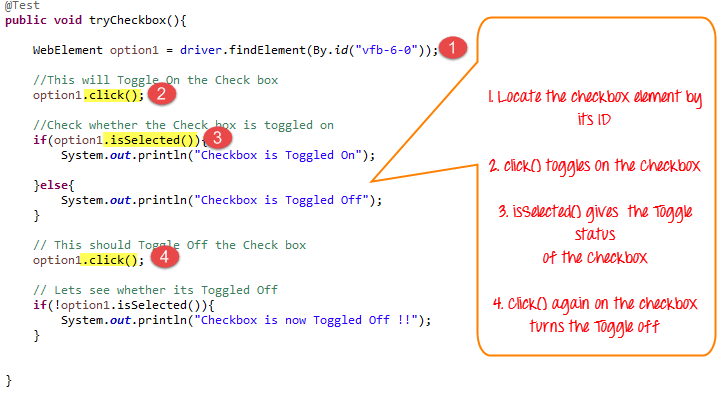
复选框的选中/取消选中也使用click()方法完成。
以下代码将两次点击Facebook的“保持登录”复选框,然后在其选中时输出结果为TRUE,在其取消选中时输出结果为FALSE。
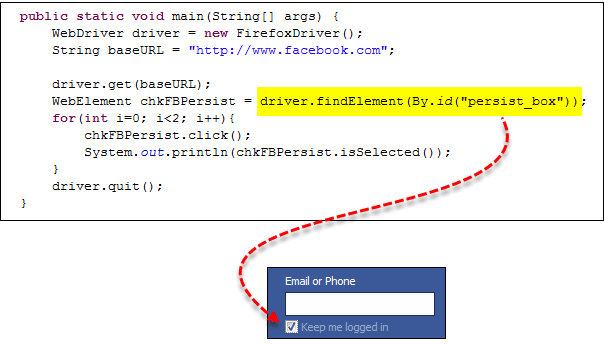
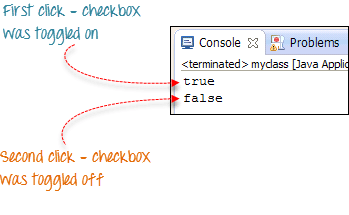
isSelected()方法用于判断复选框是否选中。
这是另一个示例:https://demo.guru99.com/test/radio.html
完整代码
这是完整的代码
import org.openqa.selenium.By;
import org.openqa.selenium.WebDriver;
import org.openqa.selenium.chrome.ChromeDriver;
import org.openqa.selenium.*;

public class Form {
    public static void main(String[] args) {

    	// declaration and instantiation of objects/variables
        System.setProperty("webdriver.chrome.driver","G:\\chromedriver.exe");
        WebDriver driver = new ChromeDriver();

        driver.get("https://demo.guru99.com/test/radio.html");
        WebElement radio1 = driver.findElement(By.id("vfb-7-1"));
        WebElement radio2 = driver.findElement(By.id("vfb-7-2"));

        //Radio Button1 is selected
        radio1.click();
        System.out.println("Radio Button Option 1 Selected");

        //Radio Button1 is de-selected and Radio Button2 is selected
        radio2.click();
        System.out.println("Radio Button Option 2 Selected");

        // Selecting CheckBox
        WebElement option1 = driver.findElement(By.id("vfb-6-0"));

        // This will Toggle the Check box
        option1.click();

        // Check whether the Check box is toggled on
        if (option1.isSelected()) {
            System.out.println("Checkbox is Toggled On");

        } else {
            System.out.println("Checkbox is Toggled Off");
        }


        //Selecting Checkbox and using isSelected Method
        driver.get("https://demo.guru99.com/test/facebook.html");
        WebElement chkFBPersist = driver.findElement(By.id("persist_box"));
        for (int i=0; i<2; i++) {
            chkFBPersist.click ();
            System.out.println("Facebook Persists Checkbox Status is -  "+chkFBPersist.isSelected());
        }
		//driver.close();

    }
}
故障排除
如果在查找元素时遇到NoSuchElementException(),则表示在Web驱动程序访问页面时页面中未找到该元素。
- 使用Firepath或Chrome中的“检查元素”再次检查你的定位器。
- 检查你在代码中使用的值是否与Firepath中当前元素的值不同。
- 某些元素的某些属性是动态的。如果发现值不同且动态变化,请考虑使用By.xpath()或By.cssSelector(),它们更可靠但更复杂。
- 有时,这也可能是等待问题,例如Web驱动程序在页面完全加载之前就执行了你的代码。
- 在findElement()之前使用隐式或显式等待添加等待。
摘要
- 下表总结了访问上述各种元素的命令
| 元素 | 命令 | 描述 |
|---|---|---|
| 复选框, 单选按钮 | click() | 用于选中/取消选中元素 |
