
Selenium 框架:数据驱动、关键字驱动和混合驱动
 Krishna Rungta
 什么是 Selenium 框架?
Selenium 自动化框架是一种代码结构,它使代码维护变得简单高效。如果没有框架,用户可能会将“代码”和“数据”放在同一个位置,这既不可重用也不可读。框架能带来有益的结果,例如提高代码重用性、更高的可移植性、降低脚本维护成本、更好的代码可读性等。
Selenium 框架的类型
Selenium WebDriver 主要创建了三种类型的框架来自动化手动测试用例
- 数据驱动框架
- 关键字驱动框架
- 混合驱动框架
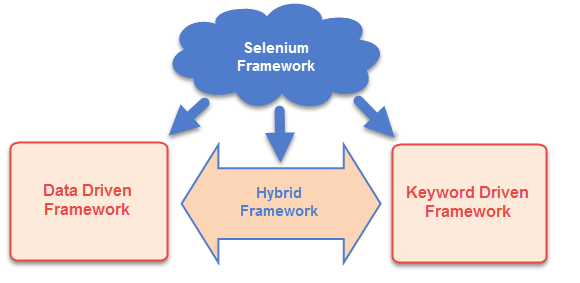
Selenium 中的数据驱动框架
Selenium 中的数据驱动框架是一种将数据集与测试用例分离的方法。一旦数据集与测试用例分离,就可以轻松修改以实现特定功能,而无需更改代码。它用于从外部文件(如Excel、.csv、.xml 或某些数据库表)中获取测试用例和套件。
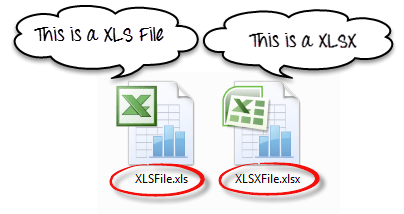
要读取或写入 Excel,Apache 提供了一个非常有名的库 POI。该库足以读取和写入 Excel 的 XLS 和 XLSX 文件格式。
要读取 XLS 文件,POI 库提供了 HSSF 实现。
要读取 XLSX,POI 库的 XSSF 实现将是首选。让我们详细研究这些实现。
我们已经在之前的教程中学习了数据驱动测试
Selenium 中的关键字驱动框架
Selenium 中的关键字驱动框架是一种通过分离通用功能和指令的关键字来加速自动化测试的方法。所有要执行的操作和指令都写入外部文件(如 Excel 表格)中。用户可以轻松控制和指定他们想要测试的功能。
以下是完整框架的外观
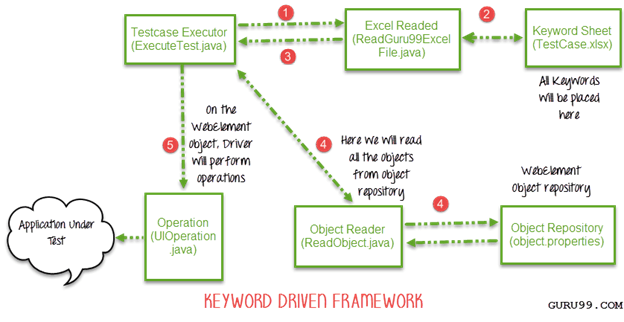
正如您所看到的,这是一个分为 5 个步骤的框架。让我们逐步详细研究它
步骤 1)
- 驱动脚本 Execute.java 将调用 ReadGuru99ExcelFile.java
- ReadGuru99ExcelFile.java 包含用于从 Excel 读取数据的 POI 脚本
步骤 2)
- ReadGuru99ExcelFile.java 将从 TestCase.xlsx 读取数据
- 工作表如下所示:
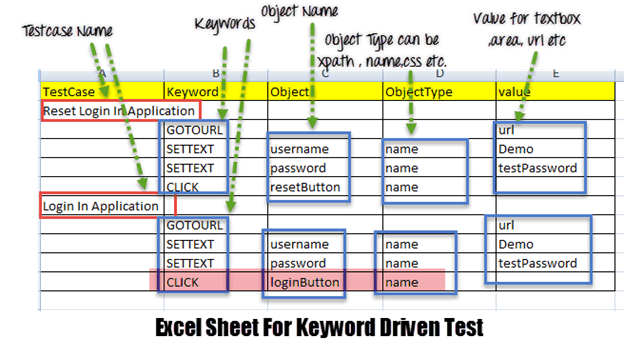
- 根据 Excel 文件中写入的关键字,框架将对 UI 执行操作。
- 例如,我们需要点击“登录”按钮。相应地,我们的 Excel 将有一个关键字“Click”。现在,AUT 页面上可能有数百个按钮,为了识别登录按钮,我们将在 Excel 中输入对象名称为 loginButton 和对象类型为 name(请参见上图中高亮显示的行)。对象类型可以是 Xpath、name CSS 或任何其他值
步骤 3) ReadGuru99ExcelFile.java 将把这些数据传递给驱动脚本 Execute.java
步骤 4)
- 对于我们所有的 UI 网页元素,我们需要创建一个对象库,在其中放置它们的元素定位器(如 Xpath、name、CSS 路径、类名等)。
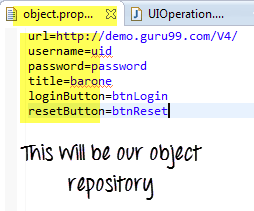
- Execute.java(我们的驱动脚本)将读取整个对象库并将其存储在一个变量中
- 要读取此对象库,我们需要一个 ReadObject 类,该类有一个 getObjectRepository 方法来读取它。
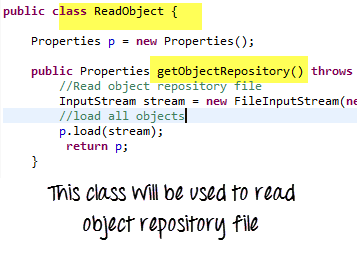
注意:您可能会想,为什么我们需要创建一个对象库。答案有助于代码维护。例如,我们在 10 个不同的测试用例中使用了名称为 btnlogin 的按钮。将来,开发人员决定将名称从 btnlogin 更改为 submit。您将必须在所有 10 个测试用例中进行更改。在对象库的情况下,您只需在库中进行一次更改。
步骤 5)
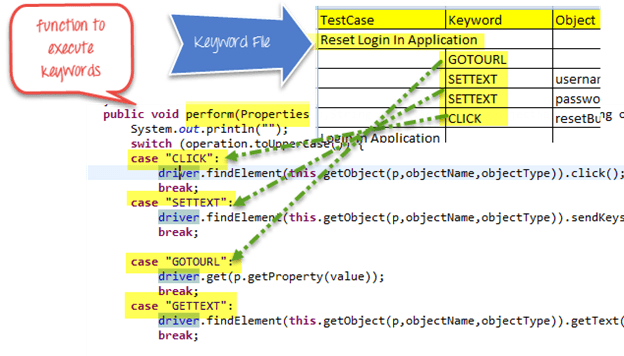
- 驱动程序将从 Excel 和对象存储库中的数据传递给 UIOperation 类。
- UIOperation 类具有根据 Excel 中提到的关键字(如 CLICK、SETTEXT 等)执行操作的功能。
- UIOperation 类是一个Java类,它包含用于对网页元素执行操作的实际代码实现。
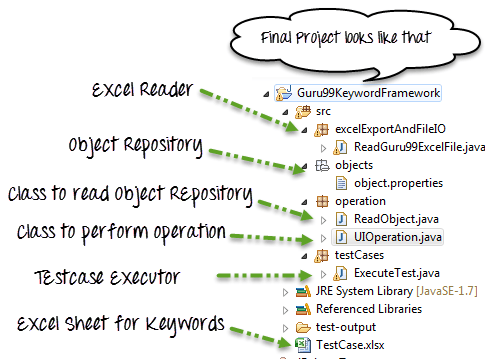
完整的项目将如下所示:
让我们看一个例子
测试场景: 我们正在执行 2 个测试用例
- 测试用例 1
- 前往
https://demo.guru99.com/V4/ - 输入用户ID
- 输入密码
- 点击重置
- 测试用例 2
- 前往
https://demo.guru99.com/V4/ - 输入用户ID
- 输入密码
- 点击登录
object.properties
url=https://demo.guru99.com/V4/
username=uid
password=password
title=barone
loginButton=btnLogin
resetButton=btnReset
ReadGuru99ExcelFile.java
package excelExportAndFileIO;
import java.io.File;
import java.io.FileInputStream;
import java.io.IOException;
import org.apache.poi.hssf.usermodel.HSSFWorkbook;
import org.apache.poi.ss.usermodel.Sheet;
import org.apache.poi.ss.usermodel.Workbook;
import org.apache.poi.xssf.usermodel.XSSFWorkbook;
public class ReadGuru99ExcelFile {

    public Sheet readExcel(String filePath,String fileName,String sheetName) throws IOException{
    //Create a object of File class to open xlsx file
    File file =    new File(filePath+"\\"+fileName);
    //Create an object of FileInputStream class to read excel file
    FileInputStream inputStream = new FileInputStream(file);
    Workbook guru99Workbook = null;
    //Find the file extension by spliting file name in substing and getting only extension name
    String fileExtensionName = fileName.substring(fileName.indexOf("."));
    //Check condition if the file is xlsx file
    if(fileExtensionName.equals(".xlsx")){
    //If it is xlsx file then create object of XSSFWorkbook class
    guru99Workbook = new XSSFWorkbook(inputStream);
    }
    //Check condition if the file is xls file
    else if(fileExtensionName.equals(".xls")){
        //If it is xls file then create object of XSSFWorkbook class
        guru99Workbook = new HSSFWorkbook(inputStream);
    }
    //Read sheet inside the workbook by its name
    Sheet guru99Sheet = guru99Workbook.getSheet(sheetName);
     return guru99Sheet;
    }
}
ReadObject.java
package operation;
import java.io.File;
import java.io.FileInputStream;
import java.io.IOException;
import java.io.InputStream;
import java.util.Properties;
public class ReadObject {
    Properties p = new Properties();
    public Properties getObjectRepository() throws IOException{
        //Read object repository file
        InputStream stream = new FileInputStream(new File(System.getProperty("user.dir")+"\\src\\objects\\object.properties"));
        //load all objects
        p.load(stream);
         return p;
    }

}
UIOperation.java
package operation;
import java.util.Properties;
import org.openqa.selenium.By;
import org.openqa.selenium.WebDriver;
public class UIOperation {
    WebDriver driver;
    public UIOperation(WebDriver driver){
        this.driver = driver;
    }
    public void perform(Properties p,String operation,String objectName,String objectType,String value) throws Exception{
        System.out.println("");
        switch (operation.toUpperCase()) {
        case "CLICK":
            //Perform click
            driver.findElement(this.getObject(p,objectName,objectType)).click();
            break;
        case "SETTEXT":
            //Set text on control
            driver.findElement(this.getObject(p,objectName,objectType)).sendKeys(value);
            break;

        case "GOTOURL":
            //Get url of application
            driver.get(p.getProperty(value));
            break;
        case "GETTEXT":
            //Get text of an element
            driver.findElement(this.getObject(p,objectName,objectType)).getText();
            break;
        default:
            break;
        }
    }

    /**
     * Find element BY using object type and value
     * @param p
     * @param objectName
     * @param objectType
     * @return
     * @throws Exception
     */
    private By getObject(Properties p,String objectName,String objectType) throws Exception{
        //Find by xpath
        if(objectType.equalsIgnoreCase("XPATH")){

            return By.xpath(p.getProperty(objectName));
        }
        //find by class
        else if(objectType.equalsIgnoreCase("CLASSNAME")){

            return By.className(p.getProperty(objectName));

        }
        //find by name
        else if(objectType.equalsIgnoreCase("NAME")){

            return By.name(p.getProperty(objectName));

        }
        //Find by css
        else if(objectType.equalsIgnoreCase("CSS")){

            return By.cssSelector(p.getProperty(objectName));

        }
        //find by link
        else if(objectType.equalsIgnoreCase("LINK")){

            return By.linkText(p.getProperty(objectName));

        }
        //find by partial link
        else if(objectType.equalsIgnoreCase("PARTIALLINK")){

            return By.partialLinkText(p.getProperty(objectName));

        }else
        {
            throw new Exception("Wrong object type");
        }
    }
}
ExecuteTest.java
package testCases;
import java.util.Properties;
import operation.ReadObject;
import operation.UIOperation;
import org.apache.poi.ss.usermodel.Row;
import org.apache.poi.ss.usermodel.Sheet;
import org.openqa.selenium.WebDriver;
import org.openqa.selenium.firefox.FirefoxDriver;
import org.testng.annotations.Test;
import excelExportAndFileIO.ReadGuru99ExcelFile;
public class ExecuteTest {
@Test
    public void testLogin() throws Exception {
        // TODO Auto-generated method stub
WebDriver webdriver = new FirefoxDriver();
ReadGuru99ExcelFile file = new ReadGuru99ExcelFile();
ReadObject object = new ReadObject();
Properties allObjects = object.getObjectRepository();
UIOperation operation = new UIOperation(webdriver);
//Read keyword sheet
Sheet guru99Sheet = file.readExcel(System.getProperty("user.dir")+"\\","TestCase.xlsx" , "KeywordFramework");
//Find number of rows in excel file
    int rowCount = guru99Sheet.getLastRowNum()-guru99Sheet.getFirstRowNum();
    //Create a loop over all the rows of excel file to read it
    for (int i = 1; i < rowCount+1; i++) {
        //Loop over all the rows
        Row row = guru99Sheet.getRow(i);
        //Check if the first cell contain a value, if yes, That means it is the new testcase name
        if(row.getCell(0).toString().length()==0){
        //Print testcase detail on console
            System.out.println(row.getCell(1).toString()+"----"+ row.getCell(2).toString()+"----"+
            row.getCell(3).toString()+"----"+ row.getCell(4).toString());
        //Call perform function to perform operation on UI
            operation.perform(allObjects, row.getCell(1).toString(), row.getCell(2).toString(),
                row.getCell(3).toString(), row.getCell(4).toString());
     }
        else{
            //Print the new testcase name when it started
                System.out.println("New Testcase->"+row.getCell(0).toString() +" Started");
            }
        }
    }
}
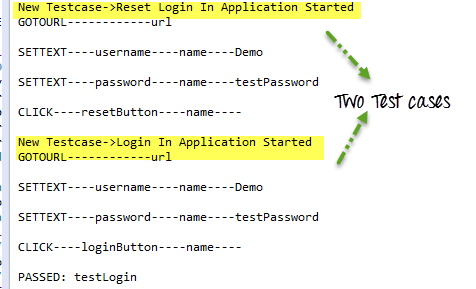
执行后,输出将如下所示 –
混合驱动框架
Selenium 中的混合驱动框架是一个概念,我们利用了关键字驱动框架和数据驱动框架的优点。它是一个易于使用的框架,允许手动测试人员仅通过查看关键字、测试数据和对象库即可创建测试用例,而无需在框架中进行编码。
在这里,对于关键字,我们将使用 Excel 文件来维护测试用例;对于测试数据,我们可以使用 Testng 框架的数据提供者。
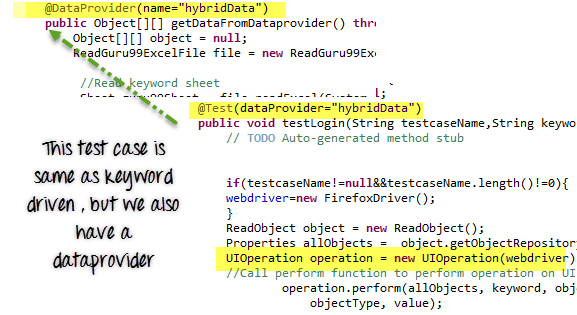
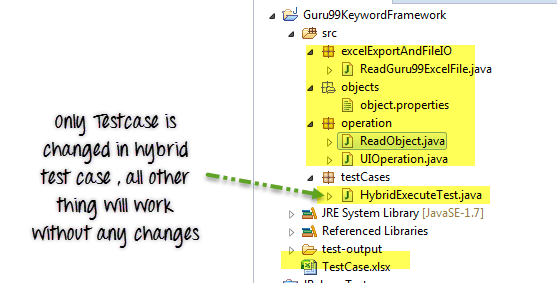
在我们的混合框架中,我们不需要改变关键字驱动框架中的任何内容,我们只需要将 ExecuteTest.java 文件替换为 HybridExecuteTest.java 文件。
这个 HybridExecuteTest 文件包含了所有带有数据提供者概念的关键字驱动代码。
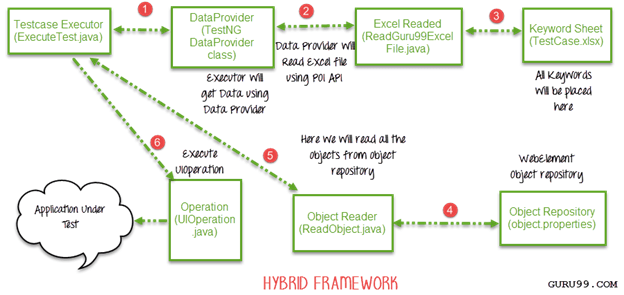
混合框架的完整图示将如下所示
HybridExecuteTest.java
package testCases;
import java.io.IOException;
import java.util.Properties;
import operation.ReadObject;
import operation.UIOperation;
import org.apache.poi.ss.usermodel.Row;
import org.apache.poi.ss.usermodel.Sheet;
import org.openqa.selenium.WebDriver;
import org.openqa.selenium.firefox.FirefoxDriver;
import org.testng.annotations.DataProvider;
import org.testng.annotations.Test;
import excelExportAndFileIO.ReadGuru99ExcelFile;
public class HybridExecuteTest {
    WebDriver webdriver = null;
@Test(dataProvider="hybridData")
    public void testLogin(String testcaseName,String keyword,String objectName,String objectType,String value) throws Exception {
        // TODO Auto-generated method stub

    if(testcaseName!=null&&testcaseName.length()!=0){
    webdriver=new FirefoxDriver();
    }
ReadObject object = new ReadObject();
Properties allObjects = object.getObjectRepository();
UIOperation operation = new UIOperation(webdriver);
    //Call perform function to perform operation on UI
            operation.perform(allObjects, keyword, objectName,
                objectType, value);

    }
@DataProvider(name="hybridData")
    public Object[][] getDataFromDataprovider() throws IOException{
    Object[][] object = null;
    ReadGuru99ExcelFile file = new ReadGuru99ExcelFile();
//Read keyword sheet
Sheet guru99Sheet = file.readExcel(System.getProperty("user.dir")+"\\","TestCase.xlsx" , "KeywordFramework");
//Find number of rows in excel file
    int rowCount = guru99Sheet.getLastRowNum()-guru99Sheet.getFirstRowNum();
    object = new Object[rowCount][5];
    for (int i = 0; i < rowCount; i++) {
        //Loop over all the rows
        Row row = guru99Sheet.getRow(i+1);
        //Create a loop to print cell values in a row
        for (int j = 0; j < row.getLastCellNum(); j++) {
            //Print excel data in console
            object[i][j] = row.getCell(j).toString();
        }
    }
    System.out.println("");
     return object;
    }
}
摘要
- 我们可以使用 Selenium WebDriver 创建三种类型的测试框架。
- Selenium 自动化框架可分为数据驱动、关键字驱动和混合框架。
- 我们可以使用 TestNG 的数据提供者实现数据驱动框架。
- 在关键字驱动框架中,关键字写入外部文件(如 Excel 文件),Java 代码将调用该文件并执行测试用例。
- 混合框架是关键字驱动和数据驱动框架的结合。
